

You're walking out of a meeting, your phone is in one hand, and you've just remembered you promised to send the pricing sheet by Friday. Until today that meant opening Tasks, tapping into a text field and typing it out with your thumb. Now you press and hold, say it, and let go.
That's voice tasks: a new way to add tasks by voice in Jottoo, with the due date picked up from what you say. It's live today on the web, iPhone, iPad and Android.
Why voice tasks
Jottoo already pulls action items out of your recorded meetings. But a lot of tasks never make it into a meeting. They turn up in a corridor, in the car park or halfway through a coffee: "chase the signed contract", "book the venue for the offsite", "call Peter back tomorrow morning".
Those are the tasks that get lost, because writing them down takes just long enough that you decide to do it later. Saying them takes a couple of seconds. I wanted the gap between remembering something and having it in Jottoo, with a date on it, to be as small as possible.
How to add a task by voice
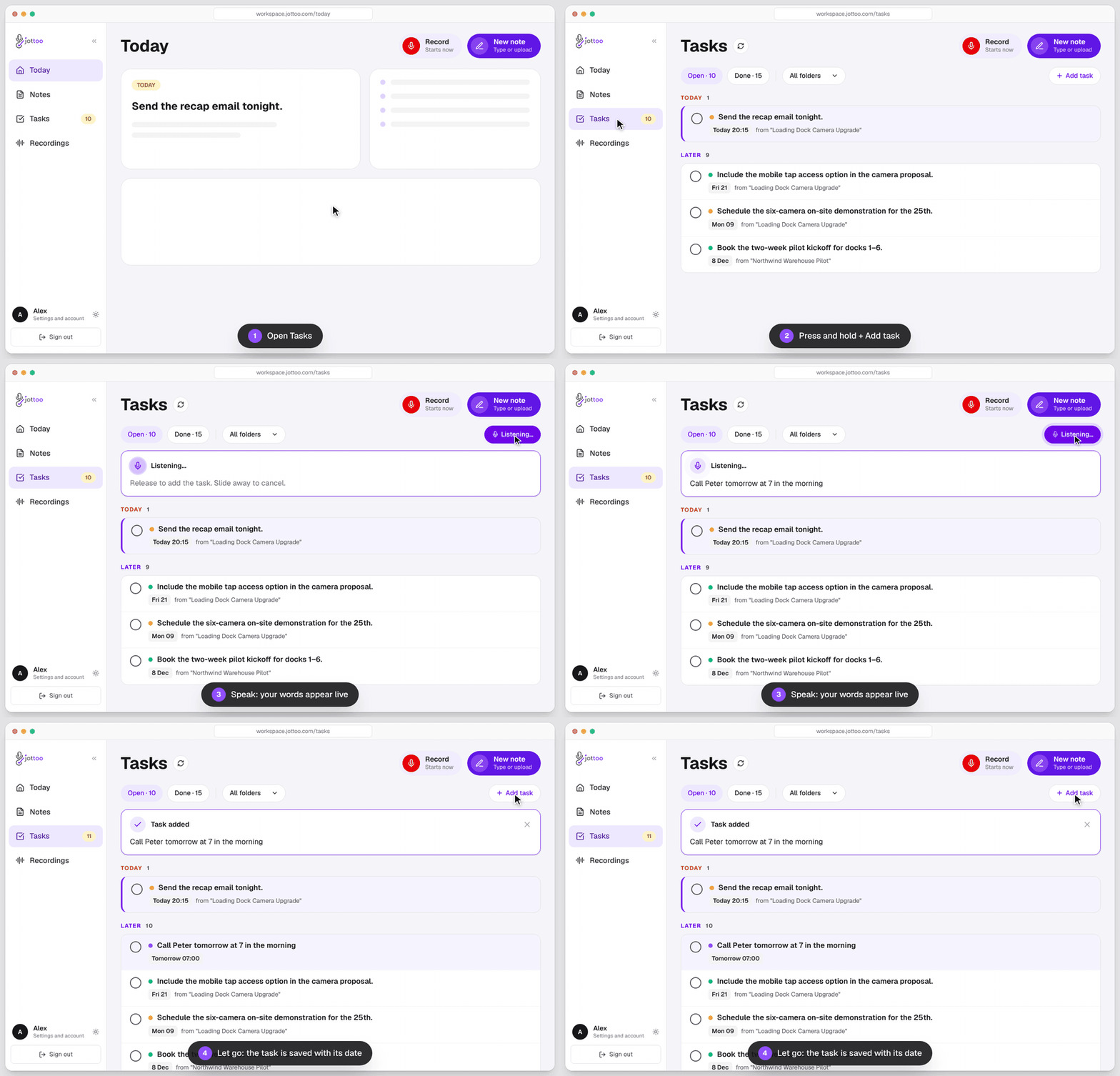
Press and hold
On the web, press and hold + Add task on the Tasks page or in the tasks side panel. On iPhone, iPad and Android, press and hold the + next to Add a task.Say the task
Speak naturally. Your words appear on screen as you talk, so you can see it's been heard correctly.Let go to save
Release and the task is saved as a normal task in your Tasks list, and on your Today view if it's due today.
Changed your mind halfway through? Slide your finger (or cursor) off the button before you let go and nothing is saved.
A normal click or tap still works the way it always has and opens the text field, so if you'd rather type, nothing changes for you.
Say the due date out loud
A task without a date is a wish. So voice tasks pick up the date and time you say, the same way typed tasks do:
- "Call Peter tomorrow at 7 in the morning"
- "Dentist at 3:30pm"
- "Send Sarah the proposal on Monday"
- "Lunch with the Acme team at noon"
A weekday sets the task for that day. A time without a day is set for the next time that time comes round, so "at 3:30pm" said at 4pm lands tomorrow afternoon, not in the past. Once a task has a due date, it gets a deadline reminder like any other task in Jottoo.
Voice tasks in English, Spanish and Arabic
Voice tasks work in all three languages Jottoo speaks, and you can mix them in one sentence. That matters more than it sounds: plenty of people think in one language and name clients, products or places in another.
Dates and times are understood in Spanish and Arabic too, for example "mañana a las 7 de la mañana", "el lunes a la una", "بكرة الساعة ٧ الصبح" or "يوم الاتنين الساعة ١٠".
Is voice input private?
Your audio is streamed to our transcription provider while you hold the button, turned into text, and that's it. The recording is never stored. Only the text of the task is saved to your account, the same as if you had typed it.
Our transcription provider, AssemblyAI, doesn't use your audio to train its models. You can read the full picture on how your data works.
Good to know
- Two minutes per task. A voice task stops on its own after 2 minutes and saves what you've said. In practice most tasks take a few seconds.
- You need a connection. Words appear live because the audio is transcribed as you speak, so voice tasks need an internet connection.
- Update your app. On iPhone, iPad and Android, update the Jottoo app from the App Store or Google Play to get voice tasks. On the web it's already there.
Voice tasks are included in Jottoo's one plan and in the 7-day free trial, no credit card needed. After that, Jottoo is $13.99 USD a month with every feature included.


What's next
This is the first version, and I'd like to hear how you use it. Is holding the button comfortable? Are dates being picked up the way you'd expect? Is there somewhere else in Jottoo you'd like to hold and speak? Tell me at support@jottoo.com, and keep an eye on the roadmap for what's coming.
If you want to get more out of the tasks you do capture, 7 ways to turn meeting notes into action items is a good next read.
Fady, founder of Jottoo
Frequently Asked Questions
How do I add a task by voice in Jottoo?
Press and hold + Add task on the web, or the + next to Add a task on iPhone, iPad and Android. Speak, then let go to save it. Slide off the button before you let go to cancel.
Does Jottoo pick up the due date from what I say?
Yes. Say something like "call Peter tomorrow at 7 in the morning" or "send the proposal on Monday at 3pm" and the task is saved with that date and time.
Which languages work for voice tasks?
English, Spanish and Arabic, including mixing languages in one task.
Is my voice recording stored?
No. Audio is streamed for transcription only and is never stored. Only the text of the task is saved.
Can I add tasks by voice on iPhone and Android?
Yes. Voice tasks work on the web and in the Jottoo apps for iPhone, iPad and Android. Update to the latest version from the App Store or Google Play.
How long can a voice task be?
Up to 2 minutes. The recording stops on its own at 2 minutes and saves what you said. Most tasks take a few seconds.
Do voice tasks work offline?
No. Your words are transcribed live as you speak, so voice tasks need an internet connection.
How much do voice tasks cost?
Voice tasks are included in Jottoo's single plan, which starts with a 7-day free trial with no credit card. After that it's $13.99 USD a month.
Stay in the loop
Get notified about new posts
Get new guides by email when they're published. No spam, just the new writing.
We only use this address to send new blog notifications.
Try Jottoo on every device.
Record on iPhone, Android or the web and get a summary and a task list from every meeting.
No credit card required.