
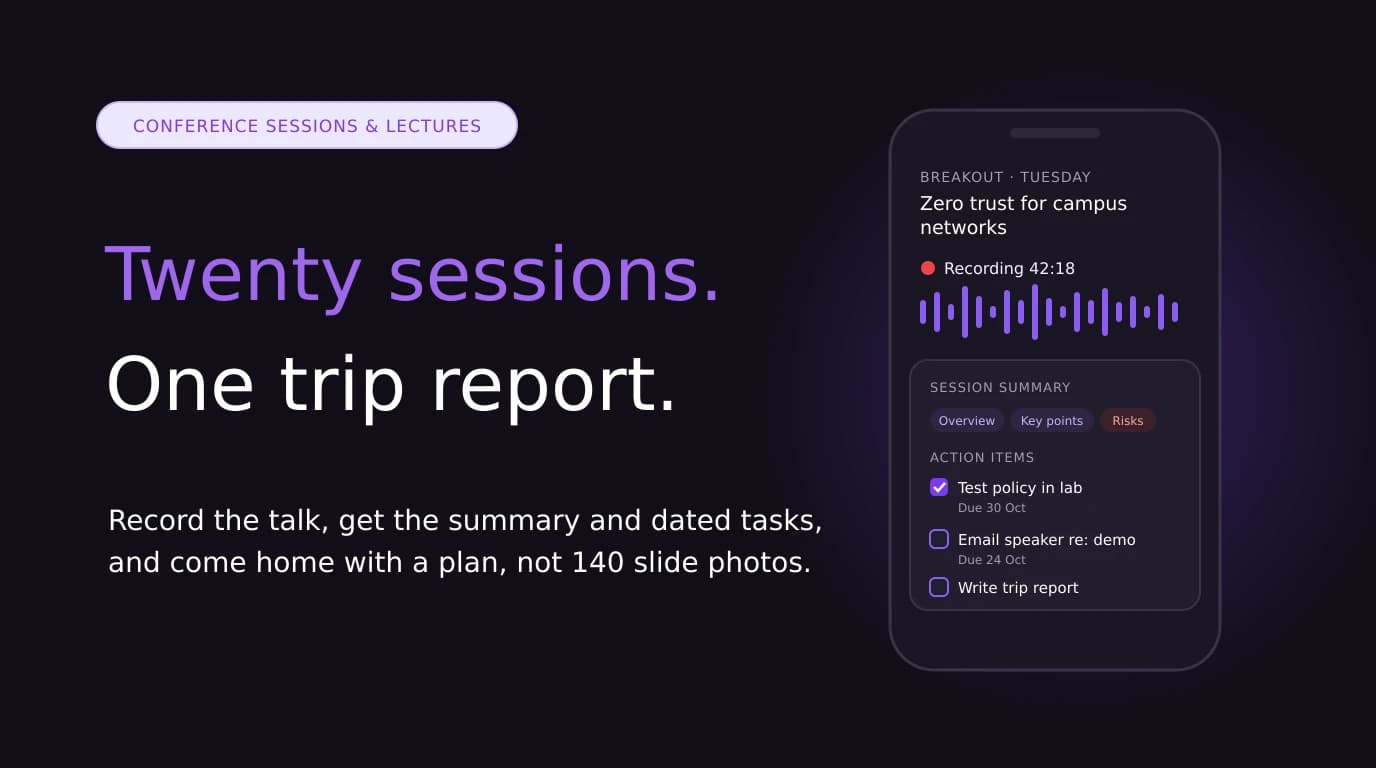

At a big event like Cisco Live, a normal day looks like this: a keynote, three or four breakout sessions, a lab, a few conversations at a partner booth and a dinner where somebody explains the thing you actually came to learn. By Thursday it has all blurred together. By the following Tuesday your manager asks what you learned and you're scrolling through 140 blurry photos of slides.
The fix isn't taking more notes. It's recording the sessions you're allowed to record, letting AI write the summary, and spending your attention on the one question that matters: what am I going to do with this?
Quick answer: Check the event's recording policy first. Then, for each session, open Jottoo on your phone, add the session title, and record. Afterwards, Jottoo transcribes the talk, separates the speakers, and gives you an overview, key points, risks and action items. Turn the action items into dated tasks, and at the end of the event pull the summaries together into a one-page trip report.
Jottoo is our product. Cisco Live is used here as an example of a large technical conference; Jottoo isn't affiliated with or endorsed by Cisco.
Why Conference Notes Fall Apart
Conference sessions are hard to take notes in, for three reasons.
- The pace is high. A 60-minute technical breakout covers architecture, a demo, a roadmap and a Q&A. If you're writing, you're not listening, and you miss the part of the demo that answered your question.
- The useful bits are spoken, not on the slides. Slide decks are often shared afterwards. The aside about "what we actually see customers get wrong", or the answer to a question from the audience, usually isn't.
- Nothing turns into action. "Look into this" scribbled in a margin doesn't survive the flight home. Notes without an owner and a date are a souvenir, not a plan.
First, Check You Are Allowed to Record
Do this before anything else. Recording rules at events vary, and they apply to you whether you use a camcorder or a phone in your pocket.
- Read the event's code of conduct or attendee terms. Many conferences prohibit attendees from recording sessions without permission from the organisers and the people being recorded. ISTE's policy is a typical example: unauthorised audio, video or photo recording of sessions is not allowed without written permission (ISTELive policies). Look for the equivalent wording for your event.
- Check whether the organiser already records it. Large events often publish official recordings. Cisco Live, for example, adds recorded sessions, keynotes and Center Stage sessions to its free On-Demand Library, which you can watch after logging in with a Cisco account. If an official recording exists, you may not need your own. Watching it later and uploading your notes may be enough.
- Ask the speaker. For smaller sessions, workshops and whiteboard talks, a quick "Do you mind if I record this for my own notes?" before the start is polite and usually welcomed. If the answer is no, type notes instead.
- Keep it for yourself. A personal recording you use to write your notes is very different from republishing someone's talk. Never post a recording of a session you didn't give.
Private conversations are a separate matter. At a booth, a customer meeting or a dinner, tell the other person you'd like to take AI notes, and stop if they're not comfortable. Recording consent laws differ by country and, in the US, by state.
What to Record at an Event Like Cisco Live
Not everything is worth recording. Here's how I decide.
| Session type | Record it? | Why |
|---|---|---|
| Keynote | Usually no | It's almost always streamed and published by the organiser |
| Breakout and technical sessions | Yes, if permitted | The spoken detail and Q&A are the most valuable part |
| Labs and hands-on workshops | Your own voice notes | You're busy at the keyboard. Narrate what you did and what broke. |
| Whiteboard or small-group sessions | Ask first | Often not recorded officially, and the discussion is the content |
| Booth and partner conversations | Only with consent | These are meetings, so treat them like meetings |
| Your own debrief at the end of the day | Always | Five minutes talking into your phone is the best summary you'll get |
That last row is underrated. Walking back to the hotel, record yourself answering three questions: what surprised me, what will I try first, and who do I need to talk to. It takes five minutes and gives the AI something no slide deck contains: your opinion.
Before the Event: Set Up Your Phone
- Install the app and sign in at home. Jottoo runs on iPhone, Android and the web. Start the free trial before you travel, not on the venue's Wi-Fi.
- Do a test recording. Record a podcast playing through a speaker across the room, and check the transcript. That's roughly what a breakout room sounds like from row ten.
- Test a weak connection. Conference Wi-Fi is famously bad. Before the event, record a short note with poor signal and check it saves and processes once you're back online.
- Pack a battery bank. Recording several hours of sessions uses battery, and the screen being on uses more.
- Free up storage. Audio is small compared with video, but a full day of sessions still adds up.
During a Session: the Two-Minute Routine
- Sit near the front or near a speaker. Most rooms use a PA system, so the closest loudspeaker matters more than the stage. Avoid seats next to the door or the coffee table.
- Name the note before you start. Use the session title and its code from the event app, for example "Session code, Zero trust for campus networks, Tuesday". Searching later is much easier.
- Start recording when the speaker starts, not during the room shuffle beforehand.
- Put the phone face up on the table or your bag, not in a pocket. Fabric muffles audio.
- Write down only what the recording can't capture: slide numbers you want to revisit, a diagram you photographed, and your own ideas ("could fix our branch rollout problem").
- Keep recording through the Q&A. Audience questions are often the most practical ten minutes of the session.
After Each Session: Turn It Into Tasks
When you stop recording, Jottoo transcribes the session with speakers separated, then writes a summary with an overview, key points, risks and action items. For a technical talk, "risks" often catches things like a feature that's still in preview, a licensing change or a migration gotcha the speaker mentioned in passing.
Spend two minutes on the action items while the session is fresh:
- Make each one specific. "Look at the new firewall features" becomes "Test the new policy feature in the lab environment by 30 October."
- Give it a date. Jottoo turns action items into tasks with deadlines and shows them on a calendar view, so they don't vanish into the note. Our guide to turning meeting notes into action items covers how to write tasks that get done.
- Delete what you won't do. Not every idea from a conference deserves a task. Be honest.
If the session wasn't recorded by you but the organiser publishes a recording, you can watch it later and upload your own audio or typed notes to get the same summary and tasks.
After the Event: Write the Trip Report
Most companies that pay for a conference ticket expect something back. With a summary for every session, the trip report takes about twenty minutes instead of an afternoon. This is the format I use:
| Section | What goes in it |
|---|---|
| Top 3 takeaways | The ideas that change what the team does, not everything you heard |
| Sessions attended | Title, speaker, two-line summary and a link to the official recording if there is one |
| Risks and changes to watch | End-of-life dates, licensing changes, features still in preview |
| Actions | Each task with an owner and a date |
| People to follow up with | Speakers, partners and peers, with what you discussed |
Export each session note to Markdown or PDF (or copy the overviews and key points) into the template, then edit them down. The edit is where the thinking happens, so don't skip it.
Recording University Lectures
The same workflow works for lectures, seminars and training courses, with two differences.
- Check your institution's policy. Many universities have a lecture-capture policy, and some lecturers don't allow personal recordings. If you have an accessibility need, your university's disability support service can usually arrange permission.
- Use the summary as a starting point, not a replacement. Read the key points against your own notes and the slides, and turn the action items into revision tasks with dates, such as "rewrite the week 4 proof from memory by Sunday".
What Jottoo Does Not Do Yet
Honesty about limits saves you a frustrating first day at an event.
- No team workspace. Notes are personal. If several colleagues attend, each person records their own sessions and you combine summaries in the trip report.
- No calendar sync yet. You can export notes and tasks to Markdown or PDF for the trip report, but sending due dates to Google or Apple Calendar is on the roadmap, not shipped.
- No free plan. There's a 7-day free trial with no card, then one plan at $13.99 USD a month. If the event is longer than a week, start the trial a few days before it starts.
- Audio quality depends on the room. A phone in row twenty of a 2,000-seat hall won't sound like a studio microphone. Sit closer, or rely on the official recording.
Privacy matters at technical events too, where sessions sometimes include customer names or unreleased plans. Jottoo encrypts note content on your device before it syncs. Audio goes to AssemblyAI for transcription and selected text to OpenAI for summaries, and neither trains on your content. The details are on how your data works.
The Bottom Line
You don't go to a conference to collect slides. You go to change something when you get back. Record the sessions you're allowed to record, let AI handle the summary, and spend your own effort on the decisions and the dated tasks. You'll come home with a plan instead of a camera roll.
Heading to an event soon? Try the interactive demo, or start your 7-day free trial before you travel →
Sources (checked 18 October 2026):
- Cisco Live On-Demand Library help
- ISTELive attendee policies (example of a conference recording policy)
- For bot-free alternatives and how they capture audio, see the best bot-free AI note takers.
Stay in the loop
Get notified about new posts
Get new guides by email when they're published. No spam, just the new writing.
We only use this address to send new blog notifications.
Focus entirely on the customer.
Don't let note-taking interrupt your discovery. Jottoo records, transcribes, and extracts the exact business impact for you.
No credit card required.